Dual Enrollment refers to a student who attends high school but is also enrolled at a college or university. At DCTS, we have two different types of dual enrollment opportunities. Traditional dual enrollment students take classes online or in person at an outside institution. College in the High School (CHS) refers to students who take college level courses in our building, with our teachers who are certified through HACC or Penn College. At DCTS, we offer academic CHS courses, as well as program area CHS courses which are listed below.
Dual Enrollment/College in the High School Course Scheduling for 2026-2027 School Year: Students must now complete the DE/CHS contract on PowerSchool. Please see instructions here in order to access forms on PowerSchool. Both Parent and Student must complete.
DCTS Dual Enrollment Course Offerings:
| HACC CHS COURSES | PENN COLLEGE CHS COURSES |
| Academic: | Academic: |
| College Algebra | English Composition I |
| English Composition II | College Psych |
| Intro to Statistics | |
| Program: | Program: |
| CAD 154: Computer-Aided Drafting and Design | AMT109, Automotive Electrical Fundamentals |
| WEB 110: Website Creating and CMS | AMT112, Brake Systems |
| CIS 126: Computer Hardware | AMT113, Steering and Suspension |
| CIS 131: Operating Systems | ABC100, Introduction to Non-Structural Collision Repair |
| CNT 125: Network Communications Tech II | ABC104, Introduction to Non-Structural Collision Repair Applications |
| CISE 100: Info Security Fundamentals | BEM101, Introduction to Emergency Management Operations |
| CNT 120: Communications Technology | BEM103, The History & Evolution of Emergency Management |
| CNT 140: The Physical Network | MTR104, Basics of Medical Terminology |
| CIS 105: Intro to Software for Business |
HACC INformation
College In the High School (CIHS) Timeline
Steps to Apply:
The same Admissions application needs to be completed for Dual Enrollment or College in the High School classes. (If you are taking both a Dual Enrollment and College in the High School course, you only need to complete one application.)
- First, check with your school counselor to see if a HACC Application Day has been scheduled. At HACC Application Days, a HACC admissions professional comes to your school to walk you through the admissions process.
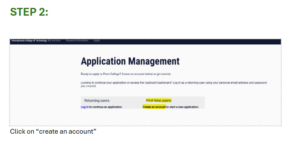
- Next, create an admissions application account online and apply to HACC. Select “Dual Enrollment” as the academic program (even if applying to the College in the High School Program). Be sure to select the correct entry term when you apply. The entry term is the semester you intend to start classes at HACC.
- Fall = August-December
- Spring = January-May
- Summer = May-August
- If you would like a parent or guardian to contact HACC on your behalf, you must file a Family Educational Rights and Privacy Act (FERPA) release.
Dual Enrollment or College in the High School students can add parent or guardian information on their HACC application or submit the FERPA release form. If HACC doesn’t have a FERPA release on file for you, HACC cannot release your student information to a parent or guardian, regardless of your age. Learn more about FERPA here →
- Complete and submit the Signature Page Form. The signature page is required to ensure all parties (student, parent or guardian and high school counselor) agree to a student’s participation in dual enrollment with HACC. The signature page is NOT a dual enrollment application, but it is an important step of the process. The signature page requires a student, parent/guardian and high school counselor or principal signature to agree to participation. A direct link to the signature page is included in your dual enrollment application.
If the student is homeschooled, the designated evaluator or parent may sign the application in place of the high counselor or principal.
- Submit your high school transcript. A high school transcript can be:
- Uploaded and attached to the signature page by your school counselor
- Uploaded in the HACC application portal
- Emailed to admissionsrecords@hacc.edu
- Activate your HAWKMail email address and myHACC Portal. Your acceptance email will be sent three to five business days after you complete the steps above to the email address you included in your application.
- Complete the HACC Orientation – once orientation is complete (If DE will be able to register for courses) If CIHS, must be completed before you receive a CRN Code to register in the class.
- Once you are registered in the class you must pay the tuition.
LAST DAY TO START AN APPLICATION 1/21/26
LAST DAY TO SUBMIT APPLICATIONS 1/28/26
REGISTRATION AND TUITION DEADLINE 2/23/26
How to Request your HACC Transcript
Dual Enrollment/College in the High School Fact Sheet
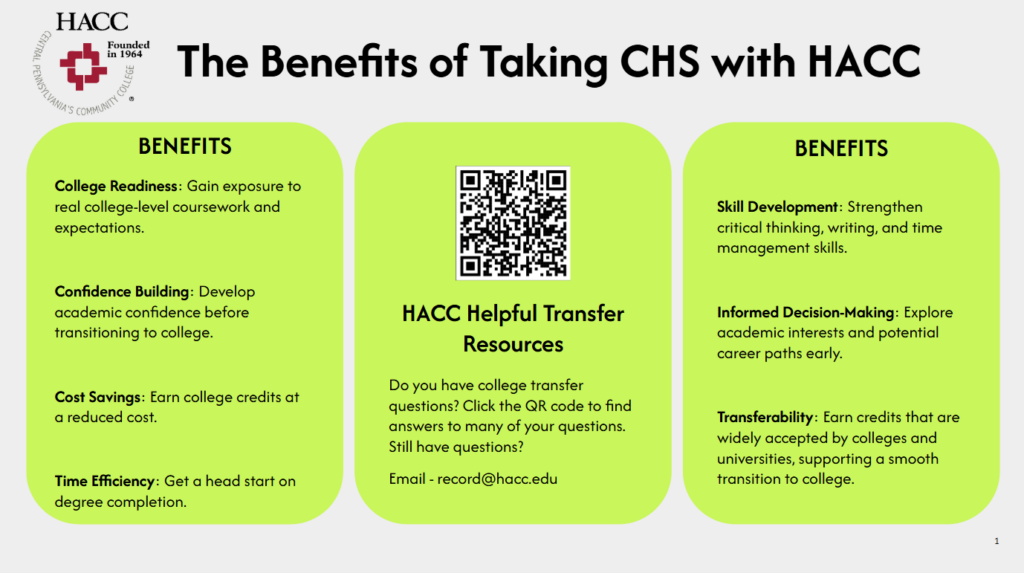
College in the High School through HACC
Students select an admission term when completing the HACC application. If a student does not attend the term that is noted on the admissions application, a “change of term” update is needed. Follow all steps listed here.
Click HERE to visit HACC’s official transfer website. You can find contact information for their officers who assist students in transferring HACC credits to another institution.
It is best practice to always check with the institution you are transferring TO in order to ensure that they will accept the credits you are taking at HACC.
How to Register at HACC: VIDEO
Penn College INformation
College In the High School (CIHS)
Steps to Apply:
An admissions application to PCT needs to be completed for College in the High School classes. The same application should to be completed whether you are taking a program or academic related course.
- First, check with your school counselor to see if a PCT Application Day has been scheduled through the high school counseling office.
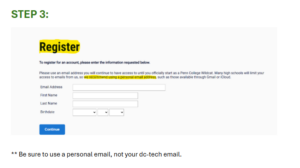
- Next, create an admissions application account online and apply to PCT (See steps below). Select the correct term for the current school year (Fall 2026 for 2026-2027 school year)
- Complete the Dual Enrollment/College in the High School Contract on PowerSchool. This needs to be submitted from a parent account.

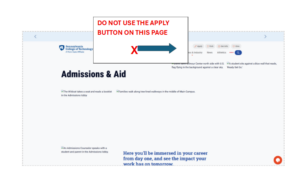
Find a PDF of the instructions here.
IMPORTANT APPLICATION REMINDERS:
- Use your personal email address, not your dc-tech email address.
- Enter your legal name as it is in Power School.
- Permanent address and Mailing address must be the same (Both are required).
- Current school attending is Dauphin County Technical School (Required).
- Home School is the high school you would be attending if you were not enrolled at DCTS (Required).
You will receive a confirmation/reference number when you have completed your application. Keep this number in a safe place (take a pic with your phone or a screen shot on your computer).
Penn College of Technology will send you an official enrollment letter which will include your PCT ID and PCT email address along with instructions on how to activate your account. Keep this letter and any passwords you create in a safe place.
Come back for more information.
For any additional information, please review the JOC board policy, or reach out to your assigned counselor.